Blog

  • Migrating a 500 GB Production MariaDB Database from Amazon RDS to EC2, With a Rollback Path

    Migrating a 500 GB Production MariaDB Database from Amazon RDS to EC2, With a Rollback Path

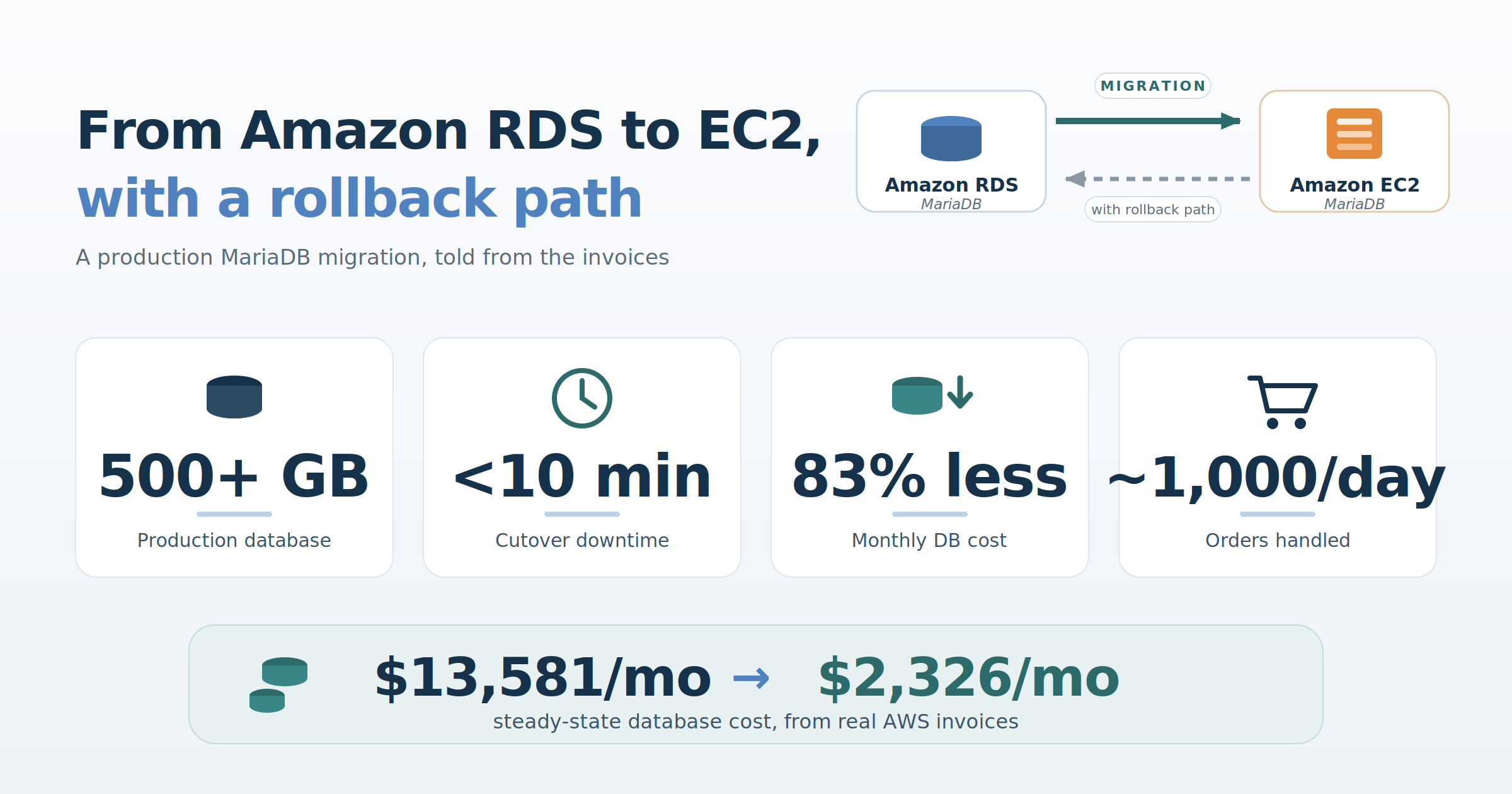
    A field report: how we moved a busy Magento store’s MariaDB database off RDS with under 10 minutes of downtime, kept a live path back to RDS for weeks afterwards, and cut the monthly database bill by more than 80 percent. All cost figures in this article come from real AWS invoices.

    Who we are, and what this article proposes

    We are luroConnect, a managed hosting platform for Magento (Adobe Commerce) and other commerce stacks. We design and operate each store’s infrastructure inside the customer’s own AWS, GCP, or Azure account, which means database architecture decisions like the one in this article are ours to make and ours to live with.

    The proposition this article defends is specific: for a large, busy production MariaDB database, self-managed MariaDB on EC2 can beat Amazon RDS on cost by a wide margin, without giving up performance. The cost claim is fully measured, with invoices included. The performance claim is qualitative and we present it as such: the customer and their agency report the store running faster after the move, not slower. Cost, to be clear, was the sole driver of this migration; faster pages were the outcome that answered a doubt, not the objective. The migration itself can be done with minutes of downtime while keeping a genuine, tested path back to RDS the whole way. We demonstrate all of it with one real customer engagement.

    The setup, and the doubt

    The database in question powers a Magento (Adobe Commerce) store doing roughly a thousand orders a day. At the time of the migration the MariaDB schema was over 500 GB of data and indexes; a later optimization effort by the customer’s agency has since brought it to about 390 GB, and where the distinction matters below, we say which figure applies. When the site was first onboarded to the luroConnect platform, the customer’s development agency insisted on Amazon RDS. Their reasoning was performance: they did not believe MariaDB on self-managed EC2 could serve a database of this size as fast as RDS. We disagreed, but RDS it was.

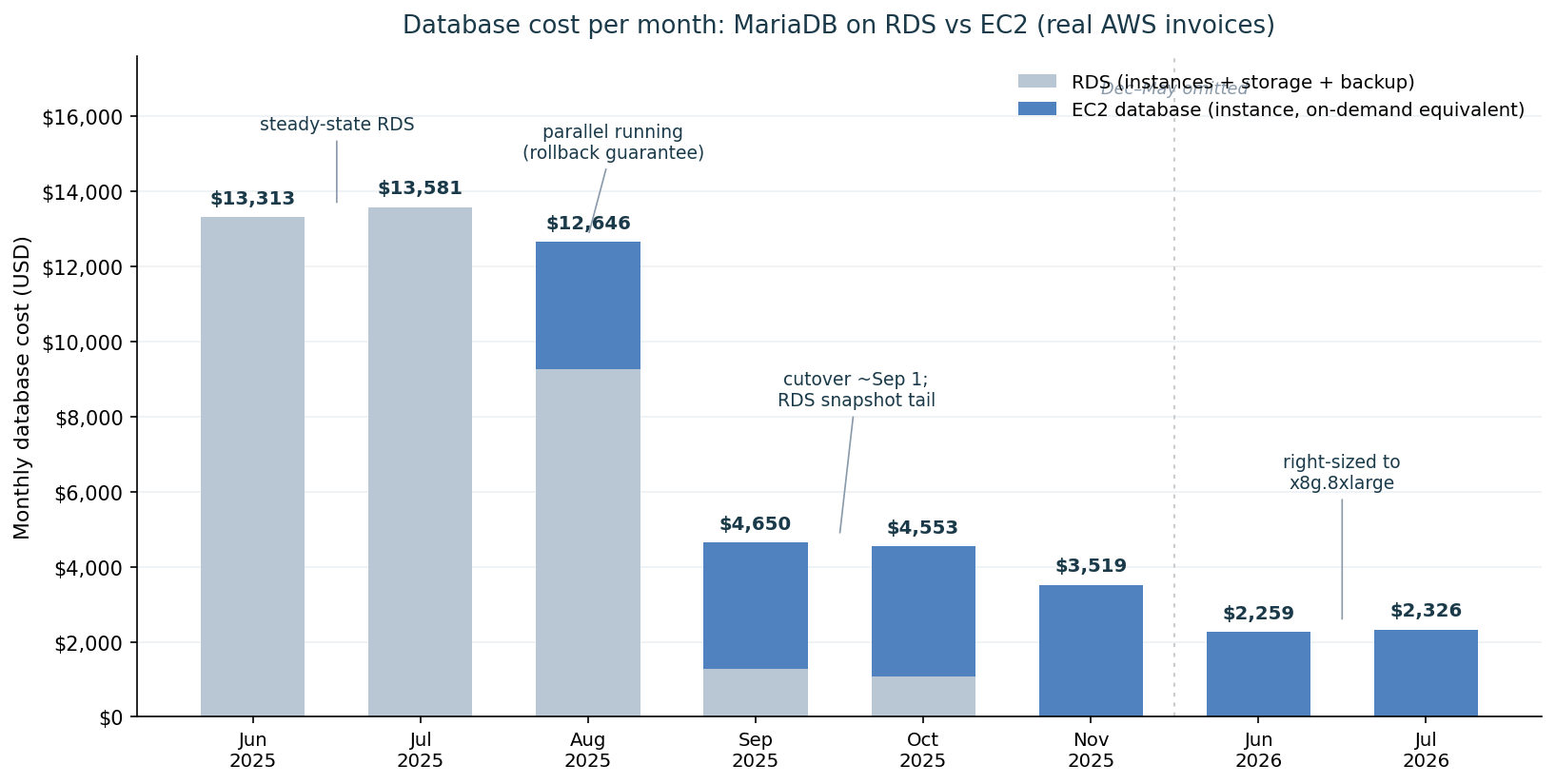
    A year later the same customer asked us to reduce their AWS bill, and the database line stood out. In June 2025, a steady-state month, RDS for this one database cost $13,313: a db.r6i.12xlarge Multi-AZ master, a db.r6i.4xlarge read replica, and $3,515 of provisioned io2/gp3 storage. July was slightly higher at $13,581. That number is what finally put “move off RDS” on the table.

    The agency agreed to try, on two conditions that shaped the entire project:

    1. A near-zero-downtime transition, and
    2. A near-zero-downtime way to roll back to RDS if anything, including performance, turned out worse.

    We had already written up the general argument for EC2 over RDS for MariaDB, covering atomic writes and the double-write buffer, replica creation, and cost structure. This article is the follow-up we promised there: how the migration was actually done.

    An incident from the RDS period, and what it changed in the design

    Cost drove the decision. Before describing the migration, though, one production incident from our time on RDS is worth recounting, because it directly shaped how the EC2 servers were laid out, and because the failure mode is a subtle one that other RDS operators may recognize.

    A read replica hit a replication error and its SQL thread stopped. On a self-managed server this is an annoyance: you diagnose, you fix or skip, replication resumes. On RDS you have no SUPER privilege, so recovery goes through stored procedures such as mysql.rds_skip_repl_error, and binlog retention is managed through CALL mysql.rds_set_configuration('binlog retention hours', ...) rather than directly.

    While the replica sat broken, the master kept retaining binlogs the replica had not consumed. RDS gives you a single storage volume, so those binlogs accumulated on the same disk as the data directory. Storage autoscaling dutifully grew the volume toward its configured 4 TB ceiling, reached it, and with no room left to write, the master stopped. A silent failure on a read replica took down the primary, by way of binlog accumulation on a shared volume that we could neither partition nor directly inspect.

    The lesson was not “RDS is bad”. It was narrower: when this class of problem occurs, the managed layer limits what you can see and do about it. Our EC2 design responds to it directly. The binlogs are written to a dedicated volume, separate from the data directory (log-bin = /backup/binlogs/mariadb-bin, on its own EBS volume alongside backups), each volume monitored independently. The RDS failure mode, binlogs silently consuming the data volume up to a hard storage ceiling, is structurally impossible in this layout: binlog growth can trip an alert on its own disk, but it can never eat the data directory’s space. And when a replica misbehaves, the full standard MariaDB replication toolkit is available, not a subset exposed through stored procedures.

    Preparation is the migration; cutover is just a switch

    The cutover took under ten minutes. The reason it could is that the preparation took weeks, and every step of it was reversible. The version question, incidentally, answered itself: Magento dictates the supported MariaDB series, so the EC2 build ran the same MariaDB version as RDS, a strict 1:1 mapping with no upgrade mixed into the migration.

    The replication chain we built looked like this:
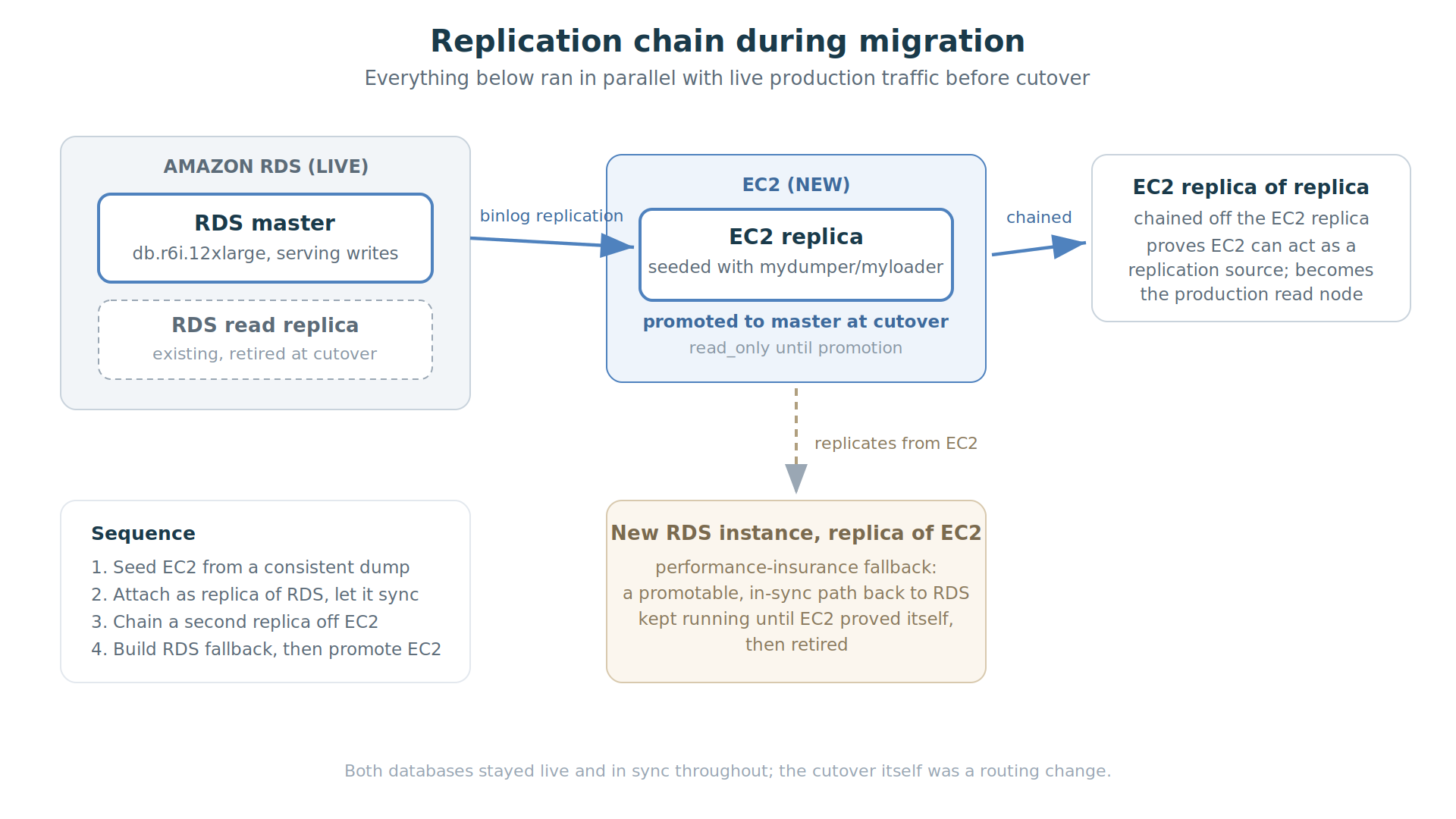
    Replication chain during the migration: RDS master to EC2 replica, a chained EC2 replica, and an RDS fallback replica of EC2

    Step 1: seed the EC2 replica. We launched the EC2 instance, provisioned a data volume plus a separate volume for binlogs and backups, and took a full backup of the RDS master using mydumper, restoring with myloader. For a database of this size, mydumper’s parallelism is the difference between a restore measured in hours and one measured in days; its metadata also records the consistent GTID position of the snapshot, which is exactly what you need to attach the restored server as a replica afterwards. Replication throughout the chain was GTID-based (MariaDB GTIDs, MASTER_USE_GTID), which made the chained topology, and later the promotion, far less error-prone than juggling binlog file-and-position coordinates across three servers. Getting a consistent snapshot out of a live RDS master is one of the fiddlier parts of the whole exercise (this is an area where RDS’s own one-click replica creation genuinely shines), and we scheduled the dump away from Magento’s indexing and setup:upgrade windows.

    Step 2: attach and let it sync. The EC2 server came up read_only, was attached to the RDS master using the GTID position from the dump’s metadata, and caught up. It then ran for days as a live replica of production, applying the real write load. This is the quiet, unglamorous phase that matters most: before anyone commits to anything, the new server has already demonstrated it can keep pace with production writes.

    Step 3: chain a replica off the replica. We then built a second EC2 server as a replica of the EC2 replica. This proved two things at once: that the EC2 server could act as a replication source (binlogs flowing out of it, not just into it), and it pre-built the read node that would serve production traffic after cutover.

    Step 4: build the way back. Finally we created a fresh RDS instance configured as a replica of the EC2 server. This was the agency’s rollback insurance, and it deserves its own section.

    The rollback design: two distinct fallbacks

    The rollback design had two mechanisms, for two different failure modes at two different times.

    The fast revert (minutes after cutover). The application connects to the database through ProxySQL, not directly. At cutover, the old RDS master was still running and still consistent. If anything looked wrong in the first minutes, reverting meant swapping the ProxySQL backend configuration back to RDS. No restore, no data movement, near-zero downtime.

    The performance fallback (days or weeks after cutover). The premise under debate was whether EC2 could match RDS under sustained production load. That question cannot be answered in a maintenance window; it takes real traffic over real days. So the RDS-replica-of-EC2 from step 4 stayed running after cutover, continuously in sync with the new EC2 master. If EC2 performance had disappointed, we could have promoted that RDS instance (stopping its replication via mysql.rds_stop_replication) and swapped ProxySQL back, again with minimal downtime and no data loss, even weeks after RDS had stopped being the source of truth.

    Through August 2025 both stacks ran in parallel, and the invoices show it: RDS $9,269 plus the new EC2 database server $3,377 in the same month.

    Cutover night

    The actual switch, with the whole chain in sync:

    1. Put the site into maintenance mode and stop the Magento crons.
    2. Promote the EC2 replica: end its replication from RDS, clear read_only.
    3. Swap the ProxySQL backend configuration from RDS to the EC2 master.
    4. Test the full site from a whitelisted IP while still in maintenance mode.
    5. Lift maintenance mode.

    Notice what is absent from that list: nothing on the application servers changed. Magento’s database connection settings in app/etc/env.php point at the ProxySQL endpoint, and that endpoint did not move, so there was no configuration to edit, no app:config:import to run, and no PHP-FPM reload to perform. The entire switch of a production database from one server to another happened one layer below the application, in a proxy backend definition. That is the practical payoff of putting the proxy in front of the database in the first place, and it is why the same operation, run in reverse, was the rollback plan.

    The switch itself (steps 1 through 3) took under 10 minutes. We then spent the remainder of a 45-minute maintenance window running a complete round of testing behind the maintenance page before reopening the site. We would rather report the longer, tested number than the shorter one; the discipline of verifying before reopening is part of why the rollback paths were never needed.

    The architecture on EC2
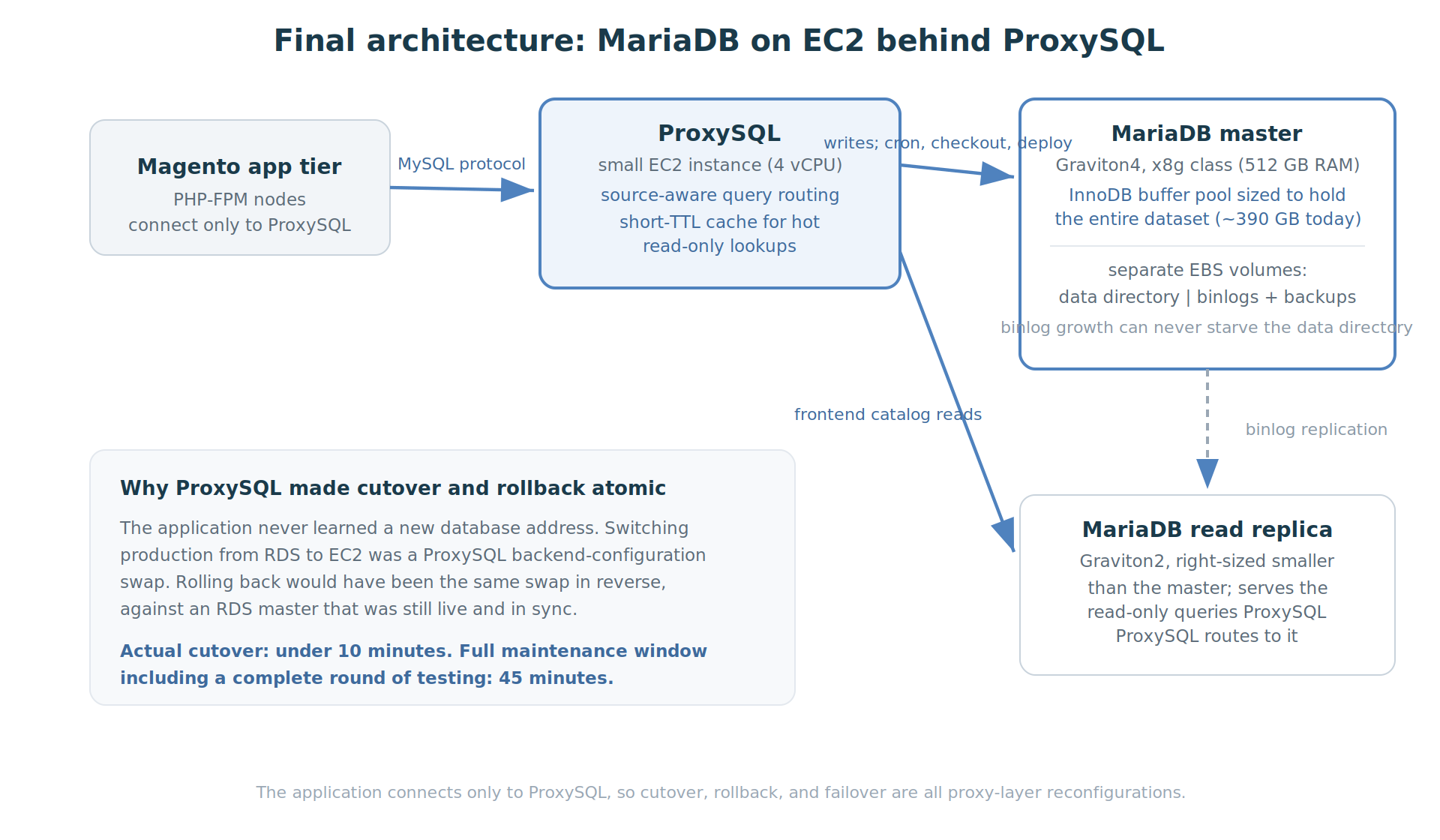
    Final architecture: Magento app tier connecting through ProxySQL to a MariaDB master and read replica on EC2

    The agency’s original concern was speed. The answer was not “EC2 with the same settings”, and it is worth being precise about which parts of the design are specific to leaving RDS and which are not.

    Size the buffer pool to the dataset. This is the part that is genuinely about EC2. On RDS, instance memory and storage are coupled to the instance class ladder, and the r6i.12xlarge master gave us 384 GB of RAM against a dataset that had grown past 500 GB. On EC2 we chose the instance to fit the data, not the other way around: a Graviton memory-optimized x8g.12xlarge with 768 GB of RAM, specifically so that innodb_buffer_pool_size could hold the entire 500 GB+ dataset with room to grow. A 512 GB instance would not have been enough at the time. Once most of the active working set can remain in the buffer pool, foreground reads are far less dependent on storage latency.

    Route through ProxySQL. ProxySQL was introduced while the database was still on RDS, specifically in preparation for the cutover: putting the application behind a proxy first meant the eventual switch of database servers could be made in the proxy rather than in the application, and it was fronting the RDS master and replica for some time before EC2 entered the picture. It is not, then, an EC2 advantage; it is the layer that made the migration a routing change. A small ProxySQL instance (4 vCPUs) fronts the database and does two jobs: routing and caching. The routing is deliberately not a blind read/write split, because a blind split breaks Magento: checkout must read its own writes, crons and indexers write and immediately read back, and deployments run DDL. So the rules are source-aware first. Traffic from the cron servers, the checkout servers, and the server that runs deployment commands is pinned to the master unconditionally. Only frontend traffic is eligible for the replica, and within it, only queries matching regular expressions that identify reads against the catalog tables are routed there. Catalog reads are the ideal candidate: they dominate frontend query volume, and a category page tolerates a moment of replication lag where an order confirmation cannot. The second job is caching: hot, frequently repeated read-only lookups (Magento store configuration is the classic case) are held in ProxySQL’s query cache on a short TTL, so the busiest queries often never reach MariaDB at all.

    Why the split lives in ProxySQL rather than in Magento: Magento Open Source has no native read/write split, and the routing described above, by source server and query pattern together, is only expressible in a proxy. The application keeps a single database endpoint and stays unaware of the topology behind it, which is precisely what made cutover and rollback a proxy-layer operation.

    One detail worth noting for Magento operators: the two EC2 database servers are deliberately asymmetric. The master is a large Graviton4 memory machine; the replica is a much smaller Graviton2 instance, sized for the read traffic it actually serves.

    High availability without Multi-AZ. The most legitimate question about leaving RDS is what replaces Multi-AZ failover, and it deserves a direct answer. Our answer is a master-to-replica failover procedure built around the same two components already described. On failure of the master, the replica is resized up to production class, promoted to master (replication stopped, read_only cleared), and ProxySQL is reconfigured to send writes to it; because the application only ever knew the ProxySQL endpoint, it needs no change at all. The procedure is wired to a CloudWatch alarm on the master instance so it can run automatically on a detected failure, and the same procedure is exposed as a button on the luroConnect dashboard for a manual, planned promotion, which is also how we handle maintenance on the master. This deliberately is not a live-live cluster, nor is it intended to reproduce RDS Multi-AZ semantics exactly. The HA model uses a MariaDB replica as a promotable standby, combined with ProxySQL for endpoint switching. In an unplanned failure, the achievable RPO depends on replication state at the time of failure, while RTO also includes promotion and, when necessary, resizing the standby. Accepting that difference is a conscious part of the trade, alongside the cost figures below.

    The customer’s feedback after the move, unprompted: “We find uncached pages are served faster.” That sentence retired the performance fallback.

    A note on evidence, since this article is otherwise built on invoices: we did not run formal before-and-after query benchmarks as part of this engagement. The performance claim is qualitative, resting on the customer’s and agency’s reports after weeks of production traffic, with the fallback to RDS available the entire time had their experience gone the other way. The cost claim, by contrast, is fully measured, and the invoices follow.

    What it cost, month by month

    So that the arithmetic can be checked, here is the database-attributable line from the invoices: RDS instance hours, RDS provisioned storage and backup storage, and after the move, the EC2 database instance (on-demand equivalent).

    Month Database cost What was running
    Jun 2025 $13,313 RDS steady state (12xlarge Multi-AZ master + 4xlarge replica)
    Jul 2025 $13,581 RDS peak; migration prep begins, Multi-AZ dropped late in the month
    Aug 2025 $12,646 Parallel running: RDS $9,269 + EC2 master syncing $3,377
    Sep 2025 $4,650 Cutover ~Sep 1; RDS remnant is mostly retained snapshots
    Oct 2025 $4,553 Snapshot storage tail on RDS + EC2
    Nov 2025 $3,519 Clean EC2 steady state (x8g.12xlarge)
    Jun 2026 $2,259 Right-sized to x8g.8xlarge
    Jul 2026 $2,326 x8g.8xlarge steady state
    Monthly database cost from AWS invoices, June 2025 to July 2026, falling from $13,581 on RDS to $2,326 on EC2

    Three things in that curve deserve comment.

    The parallel-running bump is deliberate. August’s total is barely below the RDS plateau because both stacks ran at once. That overlap was the migration method. A cheaper migration with no live source and no live fallback is a riskier one.

    The snapshot tail is real money. Sep and Oct each carried around a thousand dollars of retained RDS snapshot storage. If you migrate off RDS, put “review and prune the snapshot retention” on the checklist, or the bill keeps a ghost of the old database for months.

    The later step down is outside this migration’s scope, but the chart shows it, so briefly: the November master was an x8g.12xlarge (48 vCPU, 768 GB), sized so the buffer pool could hold the 500 GB+ dataset. CPU utilization on it was low, and once the agency’s optimization work brought the schema down to about 390 GB, a 512 GB instance could hold the whole dataset again, so the master was resized to an x8g.8xlarge at about $2,326 a month. End to end, July 2025 to July 2026, the database line fell from $13,581 to $2,326, an 83 percent reduction.

    Three fairness notes on the numbers. First, the two columns do not buy the same high availability: the June baseline includes Multi-AZ instance hours and duplicated Multi-AZ storage, a synchronous standby the EC2 architecture does not reproduce (its HA model, and the RPO/RTO difference that comes with it, is described above). For what it is worth, the customer had already dropped Multi-AZ in late July while still on RDS, so the configuration actually replaced at cutover was Single-AZ; but the headline comparison uses the June figure, and readers should know what that figure contains. Second, all figures are stated at on-demand pricing so the two platforms are compared on the same pricing basis; in practice a compute savings plan covered most of the EC2 hours, so the cash cost is lower still, and the equivalent lever on RDS is a heavier reserved-instance commitment. Third, the comparison is instance-plus-storage for the database role on both sides; the ProxySQL instance is a 4 vCPU machine whose cost is a rounding error against either column.

    RDS-specific gotchas, collected

    For anyone attempting the same move, the friction points that cost us time:

    • Binlog retention on RDS is set with CALL mysql.rds_set_configuration('binlog retention hours', N). Set it long enough to cover your dump-and-restore window plus margin, or your new replica will ask for binlogs the master has purged.
    • No SUPER: replication management on the RDS side goes through the mysql.rds_* procedures (rds_set_external_master, rds_start_replication, rds_stop_replication, rds_skip_repl_error). Script against these, not the standard statements.
    • Consistent snapshots are the hard part. RDS’s own replica creation avoids the problem; doing it yourself means mydumper with care, scheduled away from indexers and deployments.
    • Parameter groups do not map one-to-one onto my.cnf. Walk every non-default parameter and translate it deliberately. Our rule on EC2: every change is written to my.cnf even when applied dynamically, so a restart can never silently revert configuration. (The buffer pool, query cache, and max_allowed_packet all changed intentionally in the move; do not assume the RDS values were right for the new hardware.)
    • Users and grants do not come along automatically with a data-only dump strategy; migrate them explicitly.
    • Prune the snapshots after the goodbye, as the cost table above shows.

    Closing

    The doubt that started this story was reasonable. Managed databases exist because replication, backups, and failover are easy to get wrong. What this migration demonstrates: for a large, busy MariaDB database whose active working set fits in memory on modern instances, self-managed EC2 delivered production performance the customer describes as faster, at roughly one-sixth the steady-state cost, and the migration itself, done as a replication chain with a proxy-layer switch, needed less than ten minutes of downtime and carried a genuine, tested path back the whole way.

    This is not an argument that every MariaDB workload should leave RDS. RDS trades cost and control for managed operations, and that trade-off is valuable to many users. This case shows what can be achieved when a team has the operational experience to manage MariaDB, replication, backups, monitoring and failover itself.


    Pradip Shah is co-founder and Chief Architect at luroConnect. The migration described here was performed for a luroConnect customer; the customer is anonymized by agreement.
  • DDoS Protection

    DDoS Protection

    DDoS protection at the server, not just at the edge

    Most Magento sites end up behind Cloudflare. It’s the path of least resistance — set up the DNS, enable proxying, switch on the WAF, done. For a lot of sites it’s enough. But edge protection comes with its own costs: a network hop on every request, rules and decisions you can’t see in detail without the Business plan, and a control surface that’s the same for everyone on it. The moment something gets serious — a coordinated scrape, a targeted attack, a competitor’s bot army — the gaps in that setup start to matter.

    luroConnect now ships DDoS protection directly at the host layer, with a control surface exposed through our UI. It’s a managed service — luroConnect operates the rules; the UI is something the merchant or agency can use too.

    What the rules engine can do?

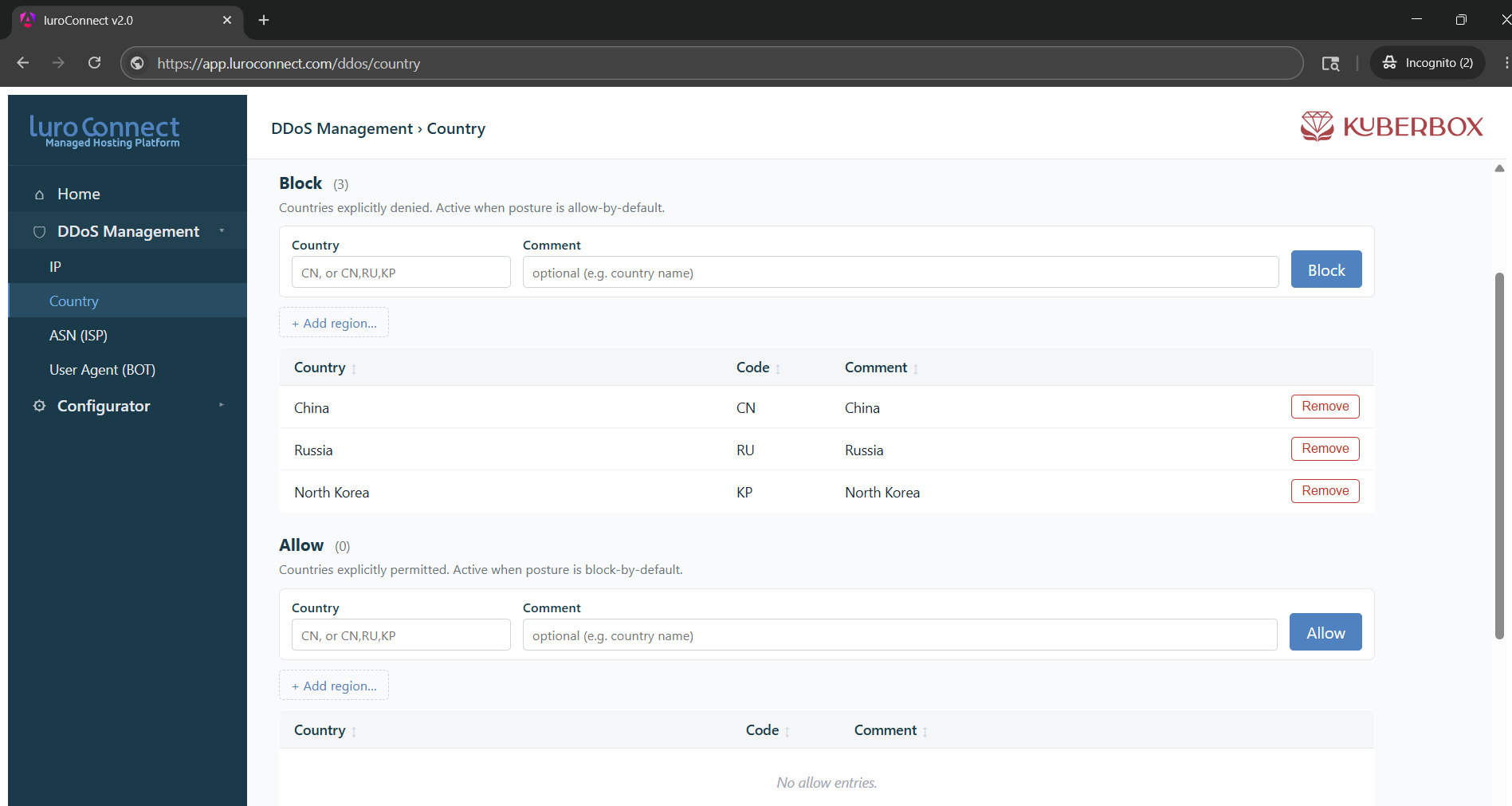
    The protection layer sits in front of Magento and decides, per request, whether to allow, challenge, or block. Decisions can be based on any combination of:

    • Country / geographic region.
    • ASN — the network the request is coming from, useful for blocking cloud providers being used as bot infrastructure.
    • IP address or range.
    • User agent.
    • Bot signatures — known crawlers, scrapers, headless browsers.

    These dimensions compose. You can say “block all traffic from these ASNs except requests from our monitoring partner’s user agent” and it does the right thing.

    Whitelist over blocklist. Whitelist rules win. If you whitelist a specific user agent — say, a partner’s integration — and the country it’s coming from is on the block list, the request still goes through. This matters more than it sounds. The default in most WAFs is the opposite, and the number of times that’s caused a legitimate integration to silently break is not small.

    Challenge instead of block. Instead of a hard 403, you can challenge suspect traffic. The challenge is a lightweight JavaScript-based human check — pass it, and the request continues; fail it, and you’re out. This is friendlier than blocking for grey-zone traffic (suspicious but possibly legitimate) because real users get through with no visible friction while headless bots don’t.

    Live logs and the analyzer

    The decision layer is built into nginx — specifically, an nginx build with ModSecurity for advanced WAF rules and njs for the request-time logic that drives the allow/challenge/block decision. ModSecurity gets its own post; this one is about the rules engine and what sits on top of it.

    Every decision the engine makes is written to an nginx access log in a custom format that captures the things you’d actually want to look at later — the matched rule, the dimensions that triggered it, the action taken, the request signature — alongside the normal access log fields. Same log pipeline as everything else nginx serves, queryable by the same tools.

    On top of that log stream sits an analyzer that aggregates per-minute: status code distribution, top IPs, top ASNs, top user agents, request rates per path, ratio of challenges to passes. Patterns surface as they form, not hours later. A burst of 4xx from a single ASN, a spike of /checkout traffic from one user agent, an unusual jump in challenges failing — these are visible in the minute they’re happening.

    The analyzer also alerts on patterns we’ve seen elsewhere across the fleet, and with permission acts on them automatically. A sudden surge from a single ASN can be flipped to auto-challenge before anyone needs to look at it. Where the merchant prefers human review, the same signal raises an alert instead. The point is that rules adjust in minutes — observation and response are part of the same loop.

    What this means in practice?

    For a merchant on luroConnect, the practical experience is: the rules already exist, tuned for the patterns we see across the fleet, and they adjust as new patterns emerge. If there’s a specific concern — a known bad actor, a region you don’t ship to, a partner integration that needs whitelisting — that’s a conversation, not a project.

    DDoS protection is one of those things that’s invisible when it works and catastrophic when it doesn’t. Putting it on the host, on an SLA, with rules powerful enough to actually shape traffic and observation tight enough to keep up — that’s the bar we think it should clear.

  • Application Aware Hosting

    Application Aware Hosting

    “Managed Hosting” Doesn’t Mean What It Used To

    For eCommerce stores running on Magento, Adobe Commerce, or mission critical custom apps on Shopify Plus — the definition needs to change.


    A few years ago, “managed hosting” was a meaningful upgrade. It meant someone else handled the server: patching the OS, monitoring disk space, restarting services when they fell over. For most websites, that was enough. The website was the server.

    That is no longer true for eCommerce.

    What your store actually is today?

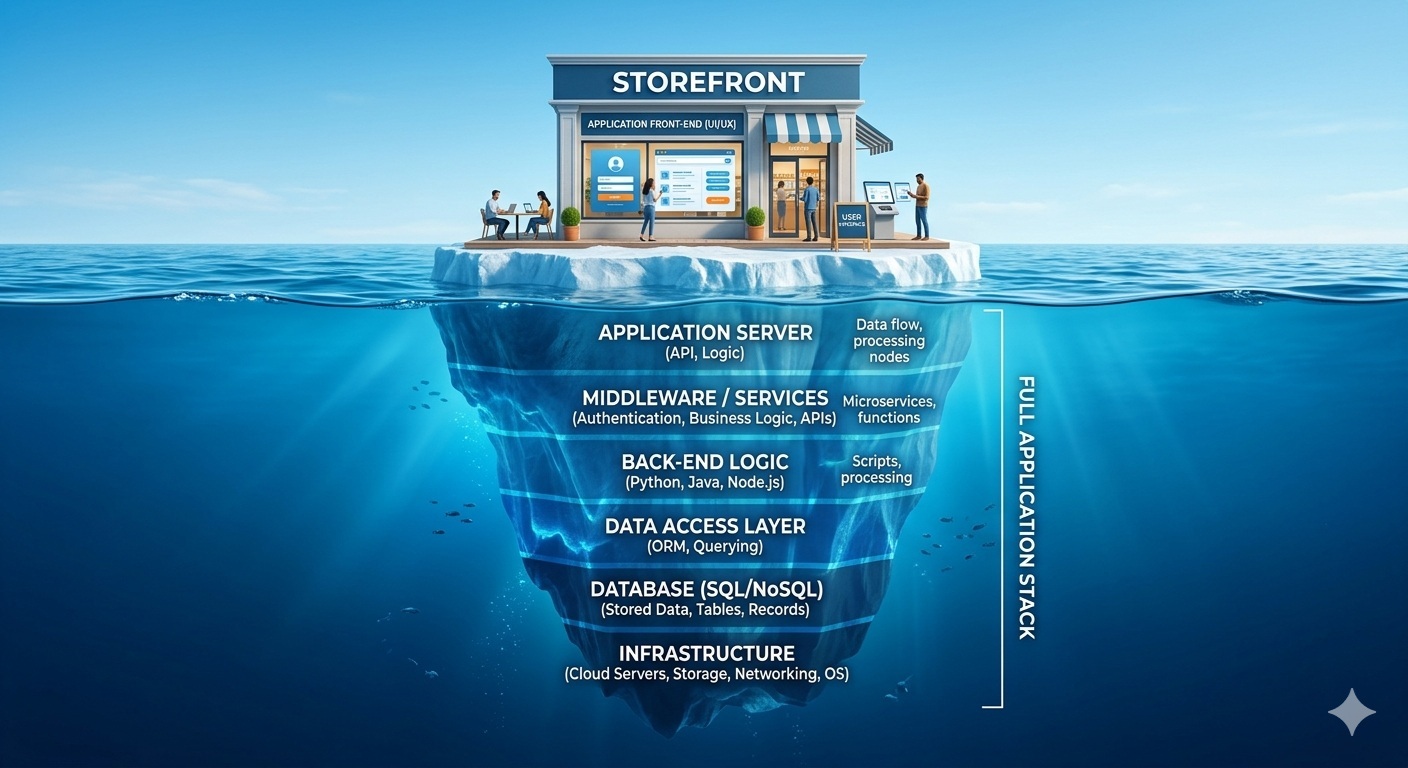
    A modern eCommerce operation is not a single application on a single server. It is a constellation of interconnected systems, each of which can fail independently, and several of which sit entirely outside your hosting infrastructure.

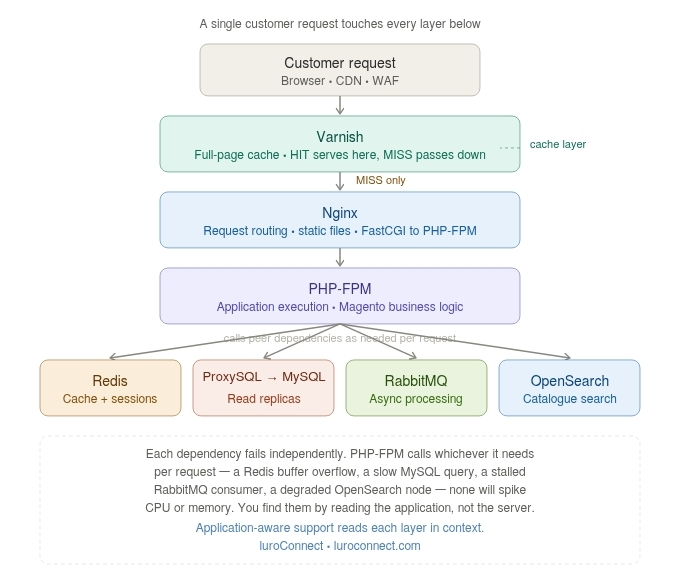
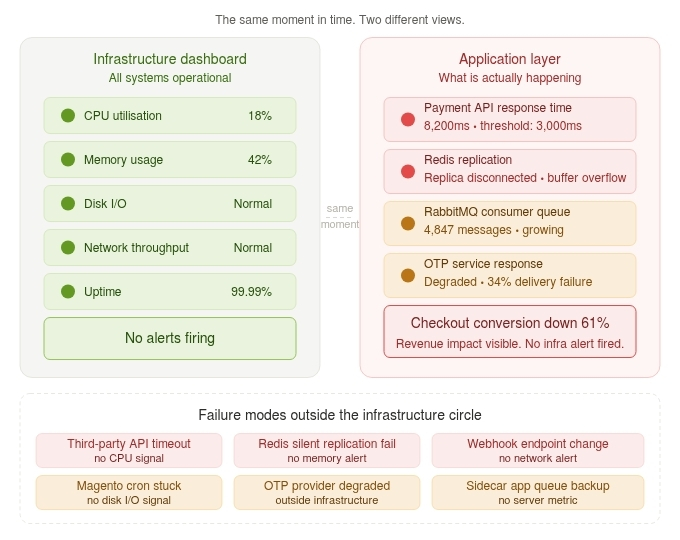
    Take a Magento store at any meaningful scale. A customer request doesn’t touch one application. It moves through Varnish (full-page cache), Nginx, PHP-FPM (your application pool), Redis (sessions and cache), MySQL via ProxySQL, RabbitMQ (async order processing), and OpenSearch (catalogue search). Six distinct components. Six independent failure modes. A problem in any one of them can manifest as a slow checkout, a broken search, or a stalled order. None of them will necessarily spike your CPU or memory.

    Now add what lives around the store. A POS application. A CRM monitoring orders and abandoned carts. An OTP service handling authentication at login and checkout.
    Middleware sitting between your store and your payment gateway, managing retries and return processing. A warehouse connector. An ERP sync.

    Some of these run on your infrastructure. Some run on third-party platforms. Some are SaaS tools your agency integrated during a project two years ago. All of them are load bearing.

    Your hosting provider monitors the server. Who is monitoring the application?

    The failure modes that don’t look like infrastructure failures.

    A third-party API — shipping estimates, tax calculation, payment gateway — starts responding in eight seconds instead of 800 milliseconds. Your server is healthy. CPU is fine. Memory is fine. But every checkout is eight seconds slower and conversion is falling. The issue is not on your infrastructure at all. It is on a dependency your infrastructure monitoring cannot see.

    A Redis replica disconnects silently. Not a crash — a overflow under a write-heavy cron job. The server looks busy because it is busy: rebuilding cache on every request instead of serving it. No infrastructure alert fires. The right signal is in the Redis replication log, cross-referenced against the cron schedule. You find it by reading the application, not the server metrics.

    A merchant on Shopify Plus runs custom middleware, an OTP application, a sidecar CRM, or a POS application alongside their store. Shopify itself is up. But the OTP application is down and every transaction is failing. The hosting dashboard shows no problem. The merchant is losing sales.

    These are not edge cases. They are the category of incident that causes the most
    business damage and gets diagnosed the slowest, precisely because they do not fit the pattern that infrastructure monitoring is built to catch.

    What “managed” needs to mean now?

    The original definition of managed hosting was appropriate for its time. When an eCommerce store was a single application on a server, managing the server was managing the store. What has changed is the application itself — the number of components, the external dependencies, the custom integrations that are now standard parts of any serious eCommerce operation.

    A more complete definition covers the application stack: what each component does, what it depends on, what a failure in it means for the business, and how quickly someone who understands all of that can diagnose and respond.

    In practice, this means:

    Knowing the dependency map. For a Magento store, that means understanding the full request path from Varnish to MySQL and every layer between. For a merchant running custom middleware and sidecar apps alongside a SaaS platform, it means understanding the components they own and operate — and what breaks when any one of them does.

    Monitoring application responses, not just server metrics. Response times and error rates at the application layer are the primary health signal. Upstream dependency health — every external API, every queue, every cache layer — needs to be instrumented and watched. Infrastructure metrics come into the analysis when application signals point there.

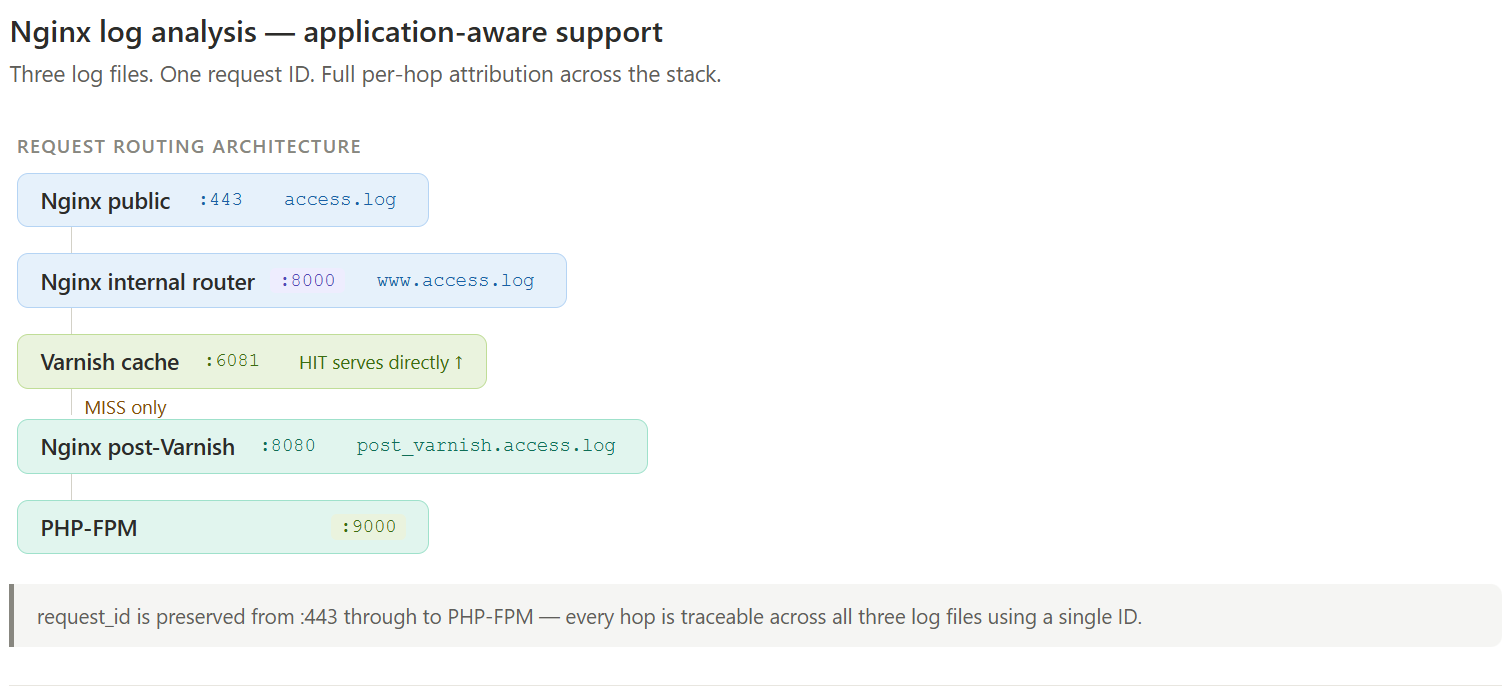
    Reading the right logs, in the right order. Nginx access logs are the first layer of signal: response times, error rates, IP-level patterns, clients failing security challenges. Anomalies there direct the investigation deeper — into PHP slow logs, application error logs, query logs — each layer narrowing the diagnosis. The incoming request picture tells you whether something is wrong; the deeper logs tell you where.

    Understanding the integration layer. When a symptom appears, the question is not just “what component is slow” but “what is that component waiting for.” The answer is often an upstream dependency — an API, a queue, a third-party service — that sits outside the infrastructure entirely.

    Why this matters for support?

    When something breaks, the path from symptom to cause determines how long the merchant is affected. A support team with application context moves faster through that path because they are not starting from first principles each time.

    Consider a real scenario: checkout is slow, but the server looks healthy. The
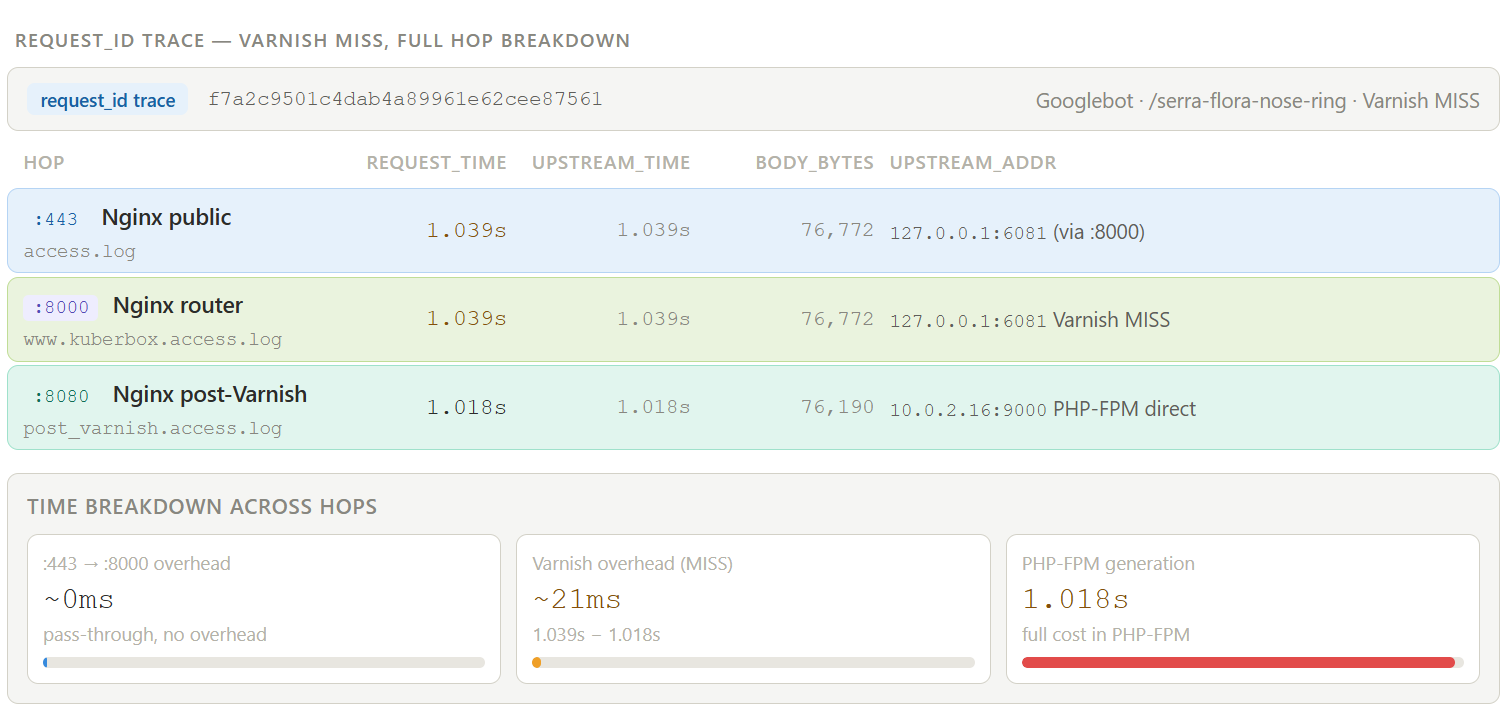
    investigation starts at Nginx access logs — response times are elevated on a specific request path. PHP slow logs confirm the delay is in a particular call. The bottleneck traces to a tax API responding in eight seconds. The third party is degraded.

    At that point, resolution is not a hosting task. It is a coordination task: the agency developer needs to implement a timeout and a fallback, or the third-party support team needs to be contacted, or the merchant needs to be informed so they can make a business decision. Application-aware support means arriving at that handoff point in minutes rather than hours, with a precise diagnosis rather than a vague report.

    The value is in the speed and accuracy of the diagnosis, and in knowing exactly who needs to act on it.

    The standard worth holding providers to

    Before your next renewal, ask your hosting provider: if my checkout breaks at 10pm tonight and your infrastructure dashboard shows green, what do you do next?

    The answer to that question defines whether you have infrastructure support or
    application-aware support.

    For eCommerce stores where the application is the revenue, the distinction matters considerably.

  • Why we don’t use cloudflare

    Why we don’t use cloudflare

    The biggest myth in the Magento Agency world is to pass traffic through cloudflare.

    Don’t get me wrong – I am not a cloudflare critic. Indeed, we have customers on their business and enterprise accounts that we recommended. The issue is that cloudflare is not a magic wand many agencies make to believe it is.

    The free or Pro accounts are not meant for production eCommerce websites.  Here are the problems of this approach when managed by an Agency

    • Cloudflare free & pro accouts can throttle as there is no SLA.
    • If you go through WAF on the internet, you have an additional internet hop.
    • Rules have to be manually managed on cloudflare.

    How luroConnect addresses security and caching concerns

    • luroConnect builds its own nginx from sources, with modsecurity and geoip plugins. Modsecurity is maintained by OWASP – the same organization that publishes the TOP-10 threats. They also publish rules in modsecurity format which we use.
    • A benefit cloudflare gives is not exposing IP of the server. luroConnect architecture uses a Cloud platform load balancer which then internally directs traffic to the server. The servers don’t have a public IP.
    • Traffic analysis tools (and soon with AI help) to identify and flag malicious traffic.
    • Ability to block IP, User Agent, ASN and complex rules such as filter parameters without referrer url, whitelist before blacklist – block AWS, digital ocean, linode, etc except whitelisted IPs for example.
    • luroConnect uses varnish for frontend page cache (FPC)
    • Use of HTTP/3 is inbuilt into our stack.
    • Use of CDN for static and media resources.

    Result: Secure website that “just opens”

    Examples:

  • Amazon RDS vs Amazon EC2 for Magento

    Amazon RDS vs Amazon EC2 for Magento

    When hosting Magento on AWS, RDS is often assumed to be the default database.

    At luroConnect we do not use RDS and have saved thousands of dollars a month for many of our customers. This write-up on RDS vs EC2 is focussed on Magento, and was born out of migrating a customer from RDS to EC2.

    The story was interesting. As we onboarded the customer over a year ago, the agency insisted that we use RDS. We had calls trying to convince them we could handle the database on EC2. The Magento database was over 500GB, with a lot of products and around 1,000 orders a day.

    A year later, we were asked to see how we could reduce the AWS costs, and the RDS costs stuck out very prominently. An RDS instance plus a read-only replica for a busy website can cost a lot! The agency was ready to try, provided we gave them a near-zero-downtime transition and a near-zero-downtime rollback to RDS.

    The feedback when we moved to EC2? “We find uncached pages are served faster.”

    The migration learnings will lead to more articles, but this one focusses on the argument of why we use EC2 instead of RDS for Magento. The follow-up on how the migration was done is here: Migrating a 500 GB Production MariaDB Database from Amazon RDS to EC2, With a Rollback Path. Needless to say, we have built the devops tools and processes that make this decision a no-brainer if you host on luroConnect.

    “Since it is expensive and popular, it must be better”

    … said my 10 year old. But everyone says this about AWS RDS, without batting an eyelid.

    It is about marketing, isn’t it? A feature you can sell at a premium, a feature not easy for competitors to emulate, a feature you may never use!

    RDS is one of them. Anyone with or without having worked with AWS tells me it is a no-brainer to use RDS for your MariaDB database, in our case for Magento websites. No questions, no arguments. I do get into arguments, and I am shown AWS documentation.

    Of course RDS has features not easy to emulate. But AWS has been good in its documentation, so for those who care to read, it is possible to replicate them, at least where it matters.

    What RDS gives you

    RDS, from my perspective, has these features:

    • Easy to change configuration values. The UI tells you clearly which parameters need a restart and which don’t. In any case, you expect the change is committed so a restart will retain it. The last bit is crucial, especially when a restart is not needed: you make a change in a parameter and forget to commit it. A restart, and you lose your change.
    • Atomic writes, not needing “double write buffers”. What are double write buffers? “This buffer was implemented to recover from half-written pages. This can happen in case of a power failure while InnoDB is writing a page (16KB = 32 sectors) to disk. On reading that page, InnoDB would be able to discover the corruption from the mismatch of the page checksum. However, in order to recover, an intact copy of the page would be needed.” Double write buffers are for safety, but lead to a performance issue: “Both the checksum calculation and the double writing consume time and thus reduce the performance of page flushing. The effect becomes visible only with fast storage and heavy write load.” For Magento this means websites with a large catalog and higher-IOPS disks. AWS RDS gives atomic writes. But AWS also documents how this can be implemented on EC2, in its guide to torn write prevention.
    • Easy to create a read-only replica, reliably. If you have worked with MySQL / MariaDB, you know the issues with creating a read-only replica (slave). Lots of documentation, but when it actually comes to making a slave, there is always a doubt whether it will work. The key reason is getting a consistent snapshot or backup. Even using AWS snapshots, we have not found a way to do this reliably and without downtime: either create a write lock, take (or start) a snapshot and release the lock, or stop MySQL, take (or start) a snapshot and restart MySQL. Taking an RDS slave, on the other hand, seems to work without downtime. Alternatively, a backup strategy also requires some locking, provided in the MySQL command line. When using a backup as the strategy we have always found it better to take backups when indexing or setup upgrade is not running.
    • Quicker at making the slave. AWS RDS is also quicker in making the slave, even though we may use a snapshot strategy. AWS snapshots can take time based on the size of the (occupied) disk. For large disks it can take long.
    • Easy to add a proxy. Again, it is just an option to select and a proxy starts. There is no need to configure CPU/RAM for the proxy. However, there is no guide to tell you a proxy will give a performance improvement.

    The flip side: cost

    But let us look at the flip side, costs. This was part of an analysis we did for an existing customer in June 2025. If you use RDS the only savings option is a Reserved Instance. EC2 gives a “lighter” commitment with a Savings Plan. (RDS estimate is for single AZ, no proxy. All disks are 12,000 IOPS, 500 Mbps. All in the Ohio region. All figures are US$ per month.)

    An illustrative pricing comparison

    Server Instance type On demand 1 yr reserved
    RDS master db.r8g.12xlarge (48 core, 384GB memory, 1500GB disk) 4,780 3,420
    RDS slave db.r8g.4xlarge (16 core, 128GB memory, 1500GB disk) 1,720 1,250
    RDS total per month 6,500 4,670
    EC2 master r8g.12xlarge (48 core, 384GB memory, 1500GB disk) 2,250 1,545
    EC2 slave r8g.4xlarge (16 core, 128GB memory, 1500GB disk) 850 635
    EC2 total per month 3,100 2,180

    A 50% month-on-month cost difference cannot be ignored!

    What does it cost you? A few seconds of downtime during slave creation, and an external proxy (we use ProxySQL on EC2) has to be set up and configured. Managing configuration values with discipline can be accomplished by a shell script, with knowledge of which values update dynamically and which do not. Values are always written to the my.cnf file, ensuring a restart will keep the new values.

    Note: I have had many devops engineers swear RDS is faster. That has not been my experience, for the same configurations. Open to discussion on this topic. RDS Aurora is a different product, and a blog for later!

  • Magento Upgrade

    Magento Upgrade

    Worried about Magento major version upgrade risk and downtime?

    Customers have some basic requirement

    • During go live have a very short downtime.
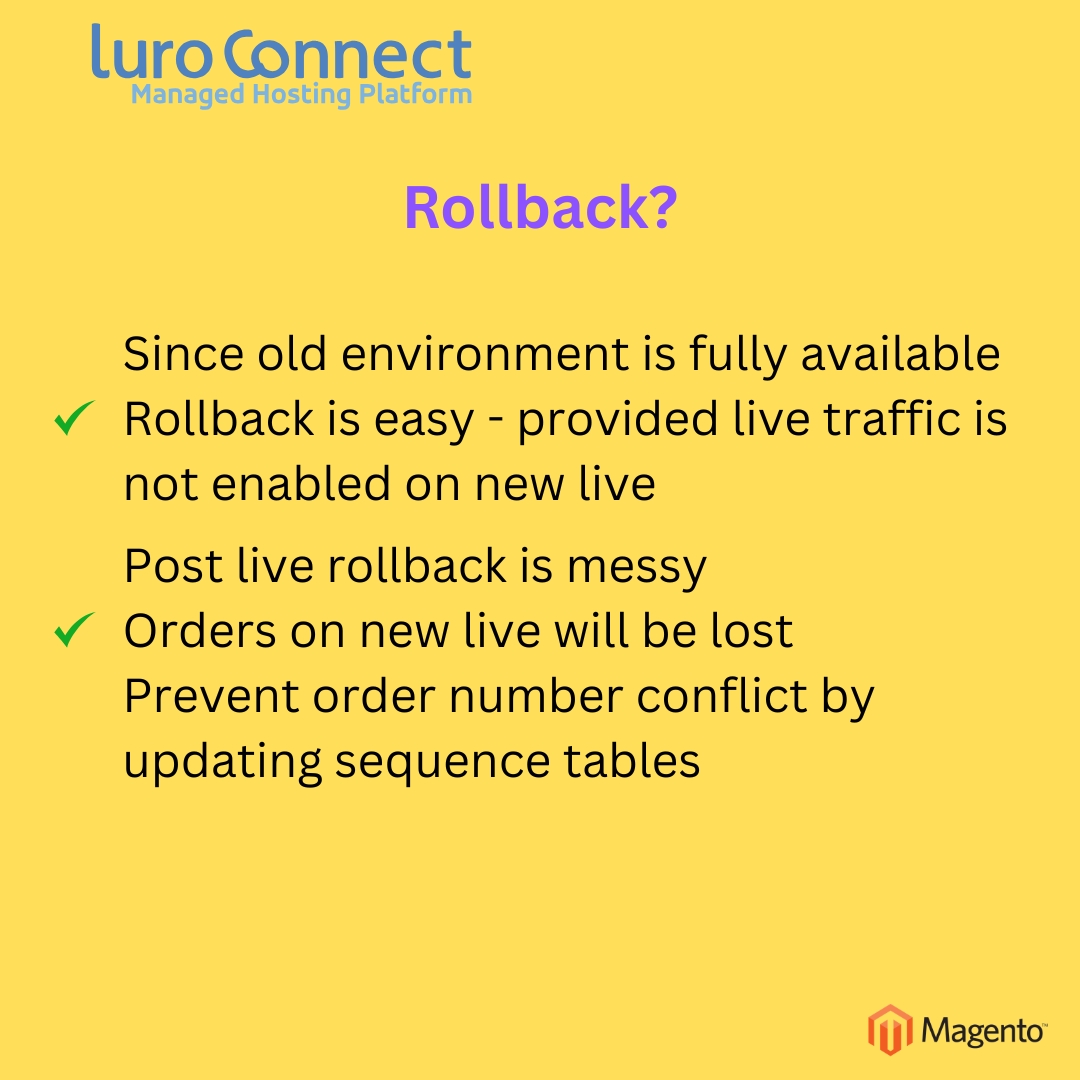
    • Give me a way to rollback when there is a problem in the upgrade

    Here is a blueprint that we follow.

    • Create a parallel environment for new staging and new prod
    • Make sure code is deployed using CI/CD
    • Make sure staging is tested often by taking a live db backup
    • Do a dry run before actual go live
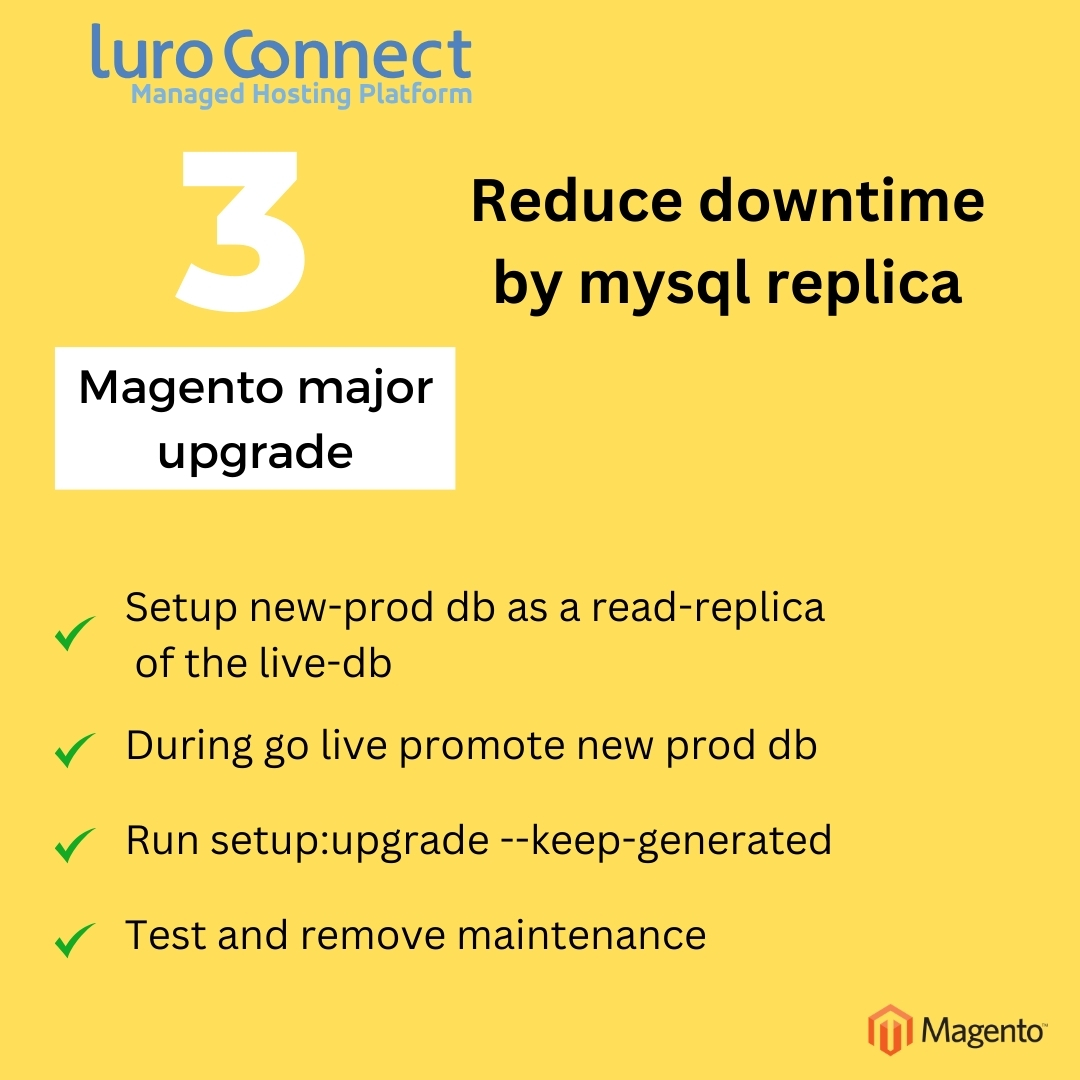
    • For reducing downtime use a mysql read-only replica strategy. During go-live (or dry run) simply promote the database and run setup upgrade (with keep-generated) flag
  • Magento merchants – let us declare freedom from codefreeze. Deploy-at-will.

    Magento merchants – let us declare freedom from codefreeze. Deploy-at-will.

    This holiday season, Magento merchants – let us declare freedom from codefreeze. Deploy-at-will.

    It is 2025 and this is not an unreasonable expectation. No more code freeze before the holiday season. Heck, changes are needed right during a sale. A UI update, a new marketing plugin integration.


    Before you get that freedom, you need to ensure you take are of this small list.

    • A staging environment “12factor app” similar to prod. (Same software versions and connections, same code, similar db). Ensure you deploy to staging before you deploy to prod.
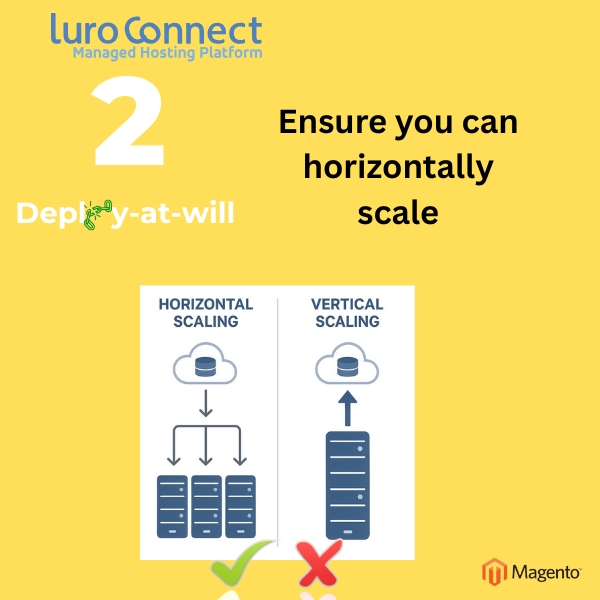
    • A horizontally scalable architecture. Does not need to autoscale, but atleast on demand add and remove CPU. No more “make it large” before the sale as you really don’t know what is large.
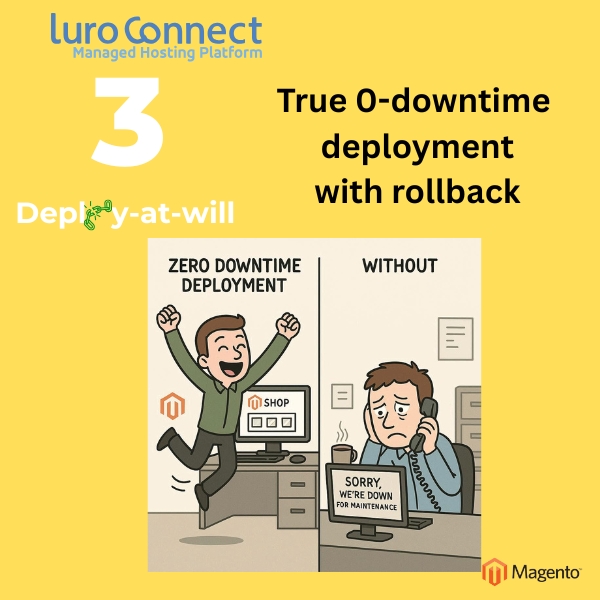
    • CI/CD with true 0-downtime deployment – along with rollback.

    If you don’t have these, good luck.
    Or, you can move to luroConnect and enjoy a holiday season like it should be – lots of sales, lots of fun, none of the headaches that pull you away from your family.

  • Partnering with luroConnect has its benefits.

    Partnering with luroConnect has its benefits.

    At luroConnect, we’re more than just a managed hosting provider — we’re your growth partner. Our goal is to create a collaborative ecosystem where agencies, consultants, and digital solution providers can thrive alongside us.

    Whether you build eCommerce stores, offer digital strategy, or manage client infrastructure, our partner program is built to support your growth while delivering dependable, high-performance hosting to your clients.

    1. Social Media Cross-Promotion:

    At luroConnect, we believe in amplifying our partners’ success. Through active social media collaboration, we help extend your reach and visibility. Here’s how we support you:

    • Post Sharing:
      We regularly share your posts on our official social media channels (LinkedIn, Twitter, Facebook, etc.), helping your content reach a wider, relevant audience.

    • Content Engagement:
      We actively engage with your posts by liking, commenting, and starting conversations to boost visibility and encourage interactions.

    • Reposting and Featuring:
      Important updates, project launches, or success stories from your end get a special spotlight through reposts and feature posts on our feeds.

    • Collaborative Campaigns:
      We plan joint social media activities like announcing new projects, celebrating milestones.

    • Partner Highlights:
      We dedicate posts to introduce our partners to our audience — highlighting your services, success stories, and areas of expertise.

    • Hashtag and Tagging Strategy:
      We use strategic hashtags and tag your profiles in relevant posts to drive higher engagement and better discoverability.
    • Story Mentions and Quick Shares:
      For time-sensitive news or quick wins, we mention your brand in stories or short posts to keep your audience updated and connected.

    2. Cross Blogging Opportunities:

    Got insights, experience, or success stories to share? We co-create blog content that highlights your expertise and showcases how our collaboration delivers results. You can also publish guest blogs on our platform, increasing your visibility in the eCommerce and hosting community.

    3. Technical Trust You Can Count On:

    Our managed hosting comes with advanced features like zero-downtime deployment, performance optimization, automated backups, and proactive monitoring — so you can focus on building, not firefighting. Your clients will notice the difference.

    4. Case Studies

    Let’s tell the story of your success together. We work with you to create high-quality, co-branded case studies that you can use in your marketing and sales efforts.

    null

  • Content Security Policy in Magento : inline scripts and nonce

    Content Security Policy in Magento : inline scripts and nonce

    Introduction to Content Security Policy

    Content Security Policy (CSP) is a HTTP header that promises to enhance security and prevent cartjack type of attacks or atleast make them difficult.

    A popular attack vector is for malicious javascript code to be added to your webpage to skim credit card or other user data as a visitor enters the data. The malicious code is added by either attacking a vulnerability in the website, adding javascript to a header, or by attacking a 3rd party service, compromising a javascript that is part of the page.

    The CSP header identifies the domains from which javascripts are loaded or provide signatures of legitimate scripts. It is a browser feature to not load scripts from other than whitelisted domains or when signatures do not match.

    Inline javascripts

    It is quite common to run javascripts inline – using a <script> html tag.
    If a website is compromised – say the HTTP head that gets injected to the page from the database is compromised, critical user data including credit cards can be leaked.

    It is essential to not only protect the site from getting injected with 3rd party js links, but also from being injected with javascript.

    CSP’s script-src can take a ‘nonce-<id>’ value that will only load javascript that are marked with this nonce attribute with the same value in the script tag.

    Varnish caching and the nonce challenge

    nonce stands for “number only once”. By definition it should be unique value per page load. If Magento were to generate nonce values, it would not be possible these in varnish as a full page cache.

    It is obvious that in order to generate the nonce value, it should be done on the “edge” – either in varnish as it returns a body, or in nginx which may be at the edge before varnish for TLS termination.

    Using nginx subfilter command and a header filter javascript (using the njs module), luroConnect replaces a placeholder nonce value in Magento with a valid nonce value.

    Securing the placeholder

    The placeholder has to be a secret between Magento and the nginx that replaces the placeholder. Our nginx changes expect Magento to send this in a response header “nonce_unique” which is used for substitution.

    Note : Writing a search and replace before Magento sends the http body is NOT considered secure. Recent COMICSTRING compromised websites may insert a script in the header and get legitmized with this code.

    /etc/nginx/lc/njs/csp_nonce.js :

    function csp_nonce_header_replace(r) {
        var unique_csp_nonce_placeholder = r.headersOut['nonce_unique'];
        if(!unique_csp_nonce_placeholder) return;
        var csp = r.headersOut['Content-Security-Policy'];
        if(!csp) return;
        csp = csp.replaceAll(unique_csp_nonce_placeholder, r.variables.ssl_session_id);
        r.headersOut['Content-Security-Policy'] = csp;
        delete r.headersOut['nonce_unique'];
    };  
          
    export default csp_nonce_header_replace;
    

    in the nginx configuration that terminates TLS and proxies to varnish

        location / {
          ## replace the placeholder in the CSP header
          js_header_filter csp_nonce_header_replace;
    
          ## replace the placeholder in the body
          sub_filter_once off;
          sub_filter_types *;
          sub_filter $upstream_http_nonce_unique $ssl_session_id;
    
          ## Proxy to varnish
          proxy_pass  http://M2_lbbackend;
          proxy_buffer_size 128k;
          proxy_buffers 4 256k;
          proxy_busy_buffers_size 256k;
          proxy_set_header X-Real-IP  $remote_addr;
          proxy_set_header X-Forwarded-For $proxy_add_x_forwarded_for;
          proxy_set_header X-Forwarded-Proto https;
          proxy_set_header X-Forwarded-Port 443;
          proxy_set_header Host $host;
    
          ## in order for nonce replacement to work, varnish cannot use gzip
          proxy_set_header Accept-Encoding 'identity;q=0';
        }
    

    in nginx.conf

    • load the js plugin
    load_module modules/ngx_http_js_module.so;
    
    • in http section add
    http{
        ... 
    
        ## use njs to add servertime header
        js_path       /etc/nginx/lc/njs/;
        js_import csp_nonce_header_replace from csp_nonce.js;
    
        ...
    }
    
  • php opcache explained

    php opcache explained

    What is php op-cache?

    Php is an interpretive language. The interpreter has to read each line of php code, parse and tokenize it – i.e. convert to internal format also called opcode or operation codes. It can then interpret by “running” the opcodes. With php 8, the JIT changes it a bit.

    A php project like Magento has a lot of files – so if php had to read each file everytime there is a reference to it, it will spend a lot of time reading the file from disk, parsing it and converting to opcodes. In order to speed up that process, php has opcode cache (or opcache), where the opcodes are kept in cache.

    This cache is stored in memory or on disk. Using and configuring memory gives the best performance.

    Opcache and JIT

    JIT transforms php from a purely interpretive language to a compiling language that generates opcodes that the underlying CPU can run. Unlike pure compiling languages like “C”, php uses a Just-in-time option and generates these CPU opcodes or machine language instrutions and stores them in memory. The opcache module is responsible for this.

    Opcache and php-fpm

    Typically php is a single threaded application. So, each hit requires a different php process. Typically at the end of the execution, the php interpretor terminates.

    php-fpm is the process manager for php. It runs keeps manages a pool of php processes and keeps track of which php process is busy. It has an ability to start and stop processes. Php-fpm communicates with a web server like nginx using the fastcgi protocol.

    Php-fpm keeps a single opcache that all the processes in the pool can share.

    How much memory does php opcache need?

    Php opcache allocates different blocks of memory for different types of data. The amount of memory needed is dependent on the number of files in your project, the number and total size of string literals and the size of each of executable code in all your files.

    JIT needs additional memory to store the machine opcodes.

    Opcache configuration parameter are stored in /etc/php.d/opcache.ini (or the opcache.ini in your system).

    memory (opcache.memory_consumption) : the memory where opcaches are stored
    string (opcache.interned_strings_buffer) : string literals is shared in a separate block of memory
    keys (opcache.max_accelerated_files) : opcache has a hash table with the filename as key. The keys are stored in this block of memory.
    JIT (opcache.jit_buffer_size) : the memory where the JIT generated machine code is stored.

    Each has a separate configuration value. The exact value you need depends on the number of files and the number of shared projects using this same php-fpm pool.

    Is there an easy way to see how much memory is being used?

    A small php program can help :

    <?php>
    $status = opcache_get_status();
    print “Memory (opcache.memory_consumption) : n“;
    print "  used_memory=" . $status['memory_usage']['used_memory'] . "n";
    print "  total_memory=" . ($status['memory_usage']['free_memory'] + $status['memory_usage']['used_memory']) . "n";
    print "  hit_ratio=" . ($status['opcache_statistics']['hits'] / ($status['opcache_statistics']['hits'] + $status['opcache_statistics']['misses']) * 100) . "n";
    print “string (opcache.interned_strings_buffer) : n“;
    print "  used_memory=" . $status['interned_strings_usage']['used_memory'] . "n";
    print "  total_memory=" . $status['interned_strings_usage']['buffer_size'] . "n";
    print "hit_ratio=" . ($status['opcache_statistics']['hits'] / ($status['opcache_statistics']['hits'] + $status['opcache_statistics']['misses']) * 100) . "n";
    print “keys (opcache.max_accelerated_files): n”;
    print "  used_memory=" . $status['opcache_statistics']['num_cached_keys'] . "n";
    print "  total_memory=" . $status['opcache_statistics']['max_cached_keys'] . "n";
    print "  hit_ratio=" . $status['opcache_statistics']['opcache_hit_rate'] . "n";
    if ($status[jit']['buffer_size']){
      print “jit (opcache.jit_buffer_size) : n“;
      print "  used_memory=" . ($status[jit']['buffer_size'] - $status['jit][ buffer_free_memory']) . "n";
      print "  total_memory=" . $status[jit']['buffer_size'] . "n";
    }else{
      print"jit is disabled”
    }

    Save this as a file name opcachestatus.php in a folder where php scripts can be executed from the browser. (Warning : do not ship this to production. Treat it like phpinfo.php).

    If used memory in any section is more than total memory, you will get better performance by increasing the corresponding value in the opcache.ini file.

    What happens when the cache memory runs out?

    • When memory is full, opcache will essentially do a restart.
    • We do not know how the jit memory behaves on being full.

    Invalidating opcache

    There are only two hard things in Computer Science: cache invalidation and naming things.
    – Phil Karlton

    Once an item is in cache, it can serve stale content – i.e. it needs to detect a php file has changed.  What makes cache invalidation hard, is that there is a tradeoff between serving stale content vs speed.

    Opcache gives you options.

    • You can ask php-fpm to always check if a file has changed
      opcache.validate_timestamps 1;
      opcache.revalidate_freq 0;
    • You can ask php-fpm check if the file has changed atmost once every x seconds – replace x by the number of seconds you want
      opcache.validate_timestamps 1;
      opcache.revalidate_freq x
    • You can ask php-fpm to never check until you clear the cache explicitly
      opcache.validate_timestamps 0

    Opcache for production

    1. We like these settings
      validate_timestamps 0
      opcache.max_wasted_percentage 50
      opcache.enable_file_override 1
      opcache.max_file_size 0
      opcache.consistency_checks 0
      opcache.preferred_memory_model ‘’
      opcache.file_update_protection 0
      opcache.huge_code_pages 1
      opcache.file_cache_only 0
      opcache.file_cache ‘’
    2. JIT : for magento production server, where the only one application is running, we like to use the following for JIT
      opcache.jit=1205
      opcache.jit_buffer_size=200M
    3. If using horizontal scaling with a load balancer, if you query opcache settings from a web application, you will get the result of the server the hit was executed from.
      This is because each php-fpm server will have its own opcache.

    Opcache and luroConnect

    luroConnect enables opcache across all our customer servers. On dev/staging, opcache is run with
    opcache.validate_timestamps 1;
    opcache.revalidate_freq 0;

    Our production servers run with
    opcache.validate_timestamps 0

    We continuously monitor opcache memory usage. Since we use a horizontally scaling architecture, we need to make sure if any app server exceeds the memory limits, all other servers are updated as well. We start with known magento required memory limits and tune to higher if needed.

    Since we turn off validate_timestamps, each code deploy results in a reload of the php.

    On php 8 servers, we use JIT with
    opcache.jit=1205

    this means we tell php to compile all functions into JIT code. We do this as all servers are running a single application and that never changes until a deployment is done.